

Download AeroWeather – Real‑time Aviation Weather Tool for Pilots
Overview
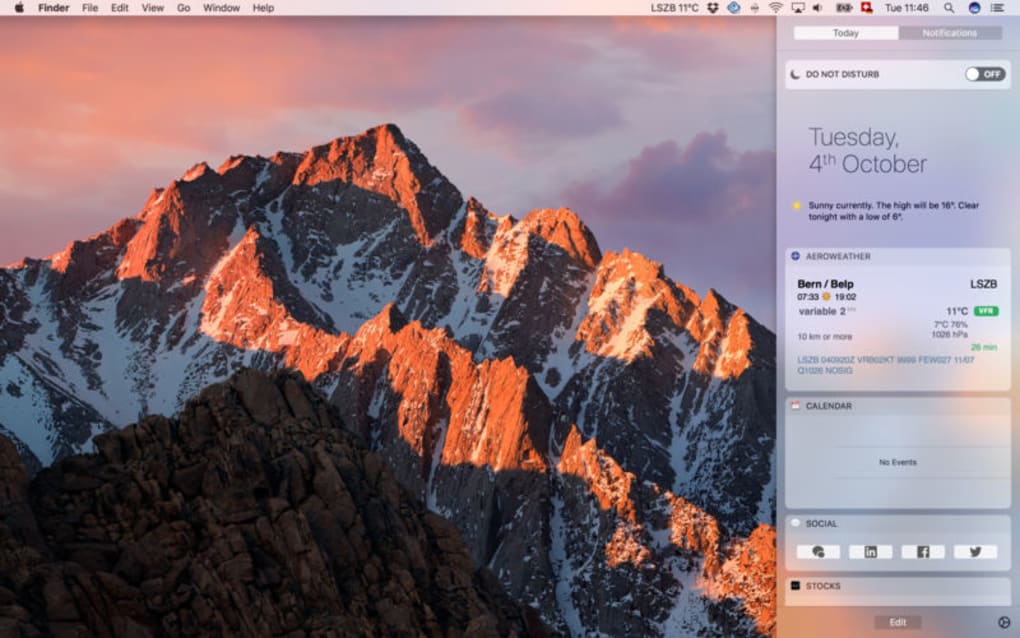
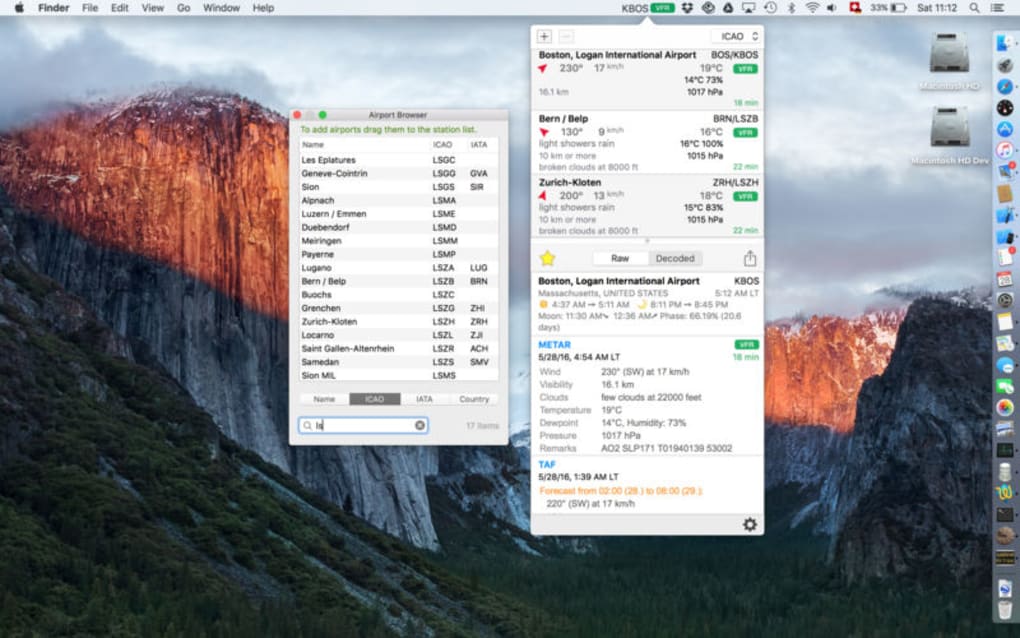
AeroWeather is a specialised weather application built for pilots, flight instructors, and frequent flyers who need precise, up‑to‑date meteorological data before every departure. Unlike generic weather apps, AeroWeather presents information in formats familiar to the aeronautics community, such as METAR, TAF, and AWOS reports. The interface lives in the system toolbar, offering a single‑click launch that delivers real‑time updates sourced from official aviation weather stations worldwide.
Whether you’re planning a cross‑country VFR flight or checking IFR conditions for a commercial operation, AeroWeather equips you with the essential data—temperature, wind speed, pressure, altitude trends, and more—directly at your fingertips. The app also supports easy sharing of weather briefings via Twitter, SMS, or email, streamlining communication with crew members or dispatchers. Its customisable parameters let you filter by airport, flight rules, and specific weather elements, ensuring you only see the data that matters for your flight plan.
With a secure, regularly updated backend, AeroWeather guarantees that the information you receive is both accurate and compliant with aviation standards, making it an indispensable tool for any pilot’s pre‑flight checklist.
Key Features
- METAR & TAF Integration: Full access to current METAR observations and TAF forecasts for any ICAO‑coded airport worldwide.
- U.S. AWOS Support: Real‑time Automatic Weather Observation System data for U.S. airports, including visibility, ceiling, and runway conditions.
- Customisable Dashboard: Choose which metrics (temperature, wind, pressure, altitude, flight rules) appear in the toolbar widget.
- One‑Click Launch: Persistent toolbar icon enables instant weather retrieval without leaving your primary flight planning software.
- Sharing Options: Export weather briefs via Twitter, SMS, or email to keep crew, dispatch, and passengers informed.
- Official Data Sources: All information is pulled directly from FAA, NOAA, and international aviation meteorology agencies.
- Multi‑Platform Sync: Settings and favourite airports sync across Windows, macOS, Android, and iOS devices.
- Automatic Updates: Background service refreshes data every 5 minutes, ensuring you always see the latest conditions.
- Flight Rule Alerts: Configurable notifications warn you when conditions shift between VFR, MVFR, IFR, or LIFR.
- Offline Cache: Recent reports are stored locally so you can view the last known data even without an internet connection.
Installation, Usage & Compatibility
Step‑by‑Step Installation
Downloading AeroWeather is straightforward. Visit the official website or your platform’s app store, click the Download button, and follow the on‑screen prompts. For Windows and macOS, an installer (.exe or .dmg) will guide you through the typical Accept‑License‑Agreement flow. Mobile users can install the app directly from Google Play or the Apple App Store. Once installed, AeroWeather automatically adds an icon to your system toolbar (Windows) or menu bar (macOS), while on mobile it appears as a persistent widget that can be accessed from the home screen.
First‑Run Configuration
Upon first launch, AeroWeather walks you through a brief wizard. You’ll select your primary operating region, favourite airports, and preferred units (Celsius/Fahrenheit, knots/mph). The wizard also asks whether you want automatic flight‑rule alerts and which sharing channels to enable. All choices are stored in the cloud, so if you later install AeroWeather on a second device, your preferences migrate seamlessly.
Daily Usage Workflow
With AeroWeather in the toolbar, a single click pulls the latest METAR and TAF for your selected airports. The dropdown panel displays a colour‑coded summary: green for VFR, amber for MVFR, red for IFR/LIFR. Hover over any line to see detailed wind direction, gusts, temperature, dew point, and pressure. For a deeper dive, click the “Full Report” button to open a resizable window showing the raw METAR/TAF text alongside a graphical wind‑rose and temperature chart. You can then hit the “Share” icon to broadcast the briefing to your crew via your chosen method.
Compatibility
AeroWeather runs natively on the most common operating systems used by aviation professionals:
- Windows 10 & 11 (64‑bit) – Full toolbar integration with low‑resource background service.
- macOS 12 Monterey and later – Menu‑bar widget with native notifications.
- Android 8.0 (Oreo) and above – Home‑screen widget and push notifications.
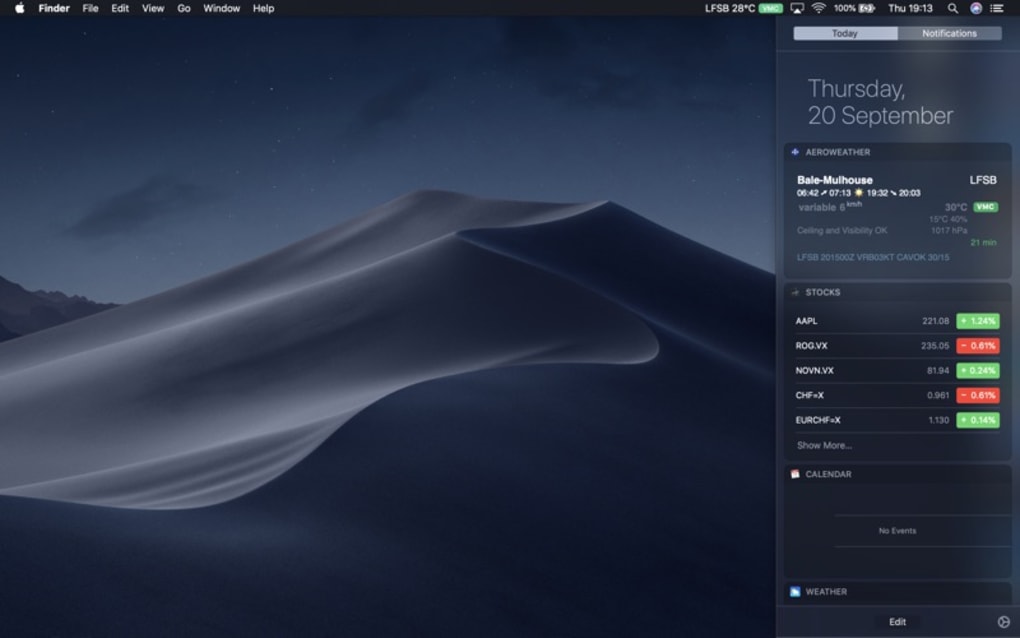
- iOS 13 and later – Today View widget and secure sharing extensions.
System requirements are modest: 200 MB of free disk space, 2 GB RAM, and an active internet connection for live data. AeroWeather also supports offline mode by caching the last 24 hours of reports, which is especially useful for remote airfields with intermittent connectivity.
Pros, Cons & Frequently Asked Questions
Pros
- Specialised aviation formats (METAR, TAF, AWOS) that pilots recognise instantly.
- Real‑time updates every 5 minutes keep briefings current.
- One‑click toolbar access eliminates the need to switch applications.
- Customisable alerts for changing flight rules enhance safety.
- Cross‑platform syncing ensures consistent settings on all devices.
- Secure data sourcing from official FAA and NOAA feeds.
- Offline caching provides last‑known weather when internet is unavailable.
Cons
- Free version limits the number of favourite airports to five.
- Advanced analytics (e.g., trend graphs over 48 hours) require a paid subscription.
- Initial setup wizard may feel lengthy for casual users.
- Push notifications are not available on iOS versions older than 13.
FAQ
Can AeroWeather be used without an internet connection?
Yes. AeroWeather stores the most recent METAR, TAF, and AWOS reports locally for up to 24 hours, allowing you to view the last known conditions even when offline.
Is the data in AeroWeather certified by aviation authorities?
All weather information is sourced directly from FAA, NOAA, and other official national aviation weather services, ensuring compliance with regulatory standards.
How does AeroWeather handle multiple favourite airports?
In the free tier you can save up to five airports. The premium subscription expands this limit to 50, with quick‑switch tabs for rapid access.
Can I share a weather briefing directly from the app?
Absolutely. AeroWeather includes built‑in sharing buttons that generate a formatted summary ready for Twitter, SMS, or email with a single tap.
What subscription options are available?
AeroWeather offers a free version with basic features, a monthly premium plan ($4.99) that unlocks unlimited airports, advanced trend graphs, and priority support, and an annual plan ($49.99) with a 15 % discount.
Expert Review
AeroWeather bridges the gap between generic weather apps and the precise needs of the aviation community. Its real‑time METAR/TAF feed, intuitive toolbar access, and robust sharing options make pre‑flight planning faster and safer. While the free tier’s airport limit may frustrate power users, the modest subscription cost unlocks a professional‑grade experience that rivals paid flight‑planning suites. Overall, AeroWeather earns high marks for accuracy, usability, and cross‑platform consistency.
Conclusion & Call to Action
For pilots, flight instructors, and frequent flyers who demand reliable, aviation‑specific weather data, AeroWeather delivers a compact yet powerful solution. Its real‑time METAR, TAF, and AWOS integration, combined with a one‑click toolbar interface, reduces the time spent searching for weather briefings and lets you focus on safe flight planning. Whether you operate on Windows, macOS, Android, or iOS, AeroWeather’s cross‑platform sync ensures a consistent experience across all your devices. Download the free version today to test the core features, and consider the premium upgrade if you need unlimited airport monitoring and advanced trend analysis. Stay ahead of the weather, stay safe in the sky—install AeroWeather now.







